ZStack과 overlay 어떤걸 써야할까?
💁🏻♀️ 해결해야할 문제

프로젝트를 진행하면서 위 이미지와 같은 뷰를 구현해야했다.
왼쪽의 텍스트는 VStack으로 간단하게 구현할 수 있었지만, 가방 이미지를 어떻게 배치를 해야할지 고민이 되었다.
이전 UIKit을 사용할때에는 AutoLayout으로 조절하여 이미지 위치를 정해서 구현했을텐데, SwiftUI를 제대로 사용하는 것이 처음이라 어떻게 구현해야할지 감이 오지않았다.
따라서 여러가지 방법을 찾아보다가 이미지의 위치가 HStack, VStack으로 구현하기 애매하다고 판단하였고, 뷰 위에 뷰를 쌓는 방식을 선택해야겠다고 생각했다.
🤔 해결 과정
SwiftUI에서 뷰 위에 뷰를 쌓는 방법에는 크게 두가지가 있다.
첫번째는 ZStack, 두번째는 overlay이다.
먼저 두가지가 어떻게 다른지 살펴보자.
1️⃣ ZStack
💡 Overview
TheZStackassigns each successive subview a higher z-axis value than the one before it, meaning later subviews appear “on top” of earlier ones.
각 연속되는 하위뷰는 이전 뷰보다 더 높은 z축 값이 할당된다고 한다.
따라서 ZStack 내부의 각각의 뷰는 이전 뷰 위에 쌓이게 되는것이다.
예시를 보자!
let colors: [Color] = [.red, .orange, .yellow, .green, .blue, .purple]

var body: some View {
  ZStack {
    ForEach(0..<colors.count) {
      Rectangle()
        .fill(colors[$0])
        .frame(width: 100, height: 100)
        .offset(x: CGFloat($0) * 10.0, y: CGFloat($0) * 10.0)
    }
  }
}

결과는 다음과 같으며 colors의 각 요소가 하나씩 쌓이면서 뷰가 구성된다.
var body: some View {
  ZStack(alignment: .bottomLeading) {
    Rectangle()
      .fill(Color.red)
      .frame(width: 100, height: 50)
    Rectangle()
      .fill(Color.blue)
      .frame(width:50, height: 100)
  } .border(Color.green, width: 1)
}
위 예시처럼 alignment 파라미터로 x, y축 좌표를 지정해줄 수도 있다.
2️⃣ overlay(alignment:content:)
일단 두가지 파라미터가 있다.
alignment
- The alignment that the modifier uses to position the implicit ZStack that groups the foreground views. The default is center.
- 암시적인 ZStack으로 어디에 배치해야 할지를 설정한다.
- default는 가운데!
content
- A
ViewBuilderthat you use to declare the views to draw in front of this view, stacked in the order that you list them. The last view that you list appears at the front of the stack. - 해당 뷰 앞에 그릴 뷰를 선언할때 사용하는
ViewBuilder이다. - 선언한 순서대로 더 앞에 쌓인다.
예시를 보자!
RoundedRectangle(cornerRadius: 8)
  .frame(width: 200, height: 100)
  .overlay(alignment: .topLeading) { Star(color: .red) }
  .overlay(alignment: .topTrailing) { Star(color: .yellow) }
  .overlay(alignment: .bottomLeading) { Star(color: .green) }
  .overlay(alignment: .bottomTrailing) { Star(color: .blue) }

struct Star: View {
  var color = Color.yellow
  var body: some View {
    Image(systemName: "star.fill")
      .foregroundStyle(color)
  }
}
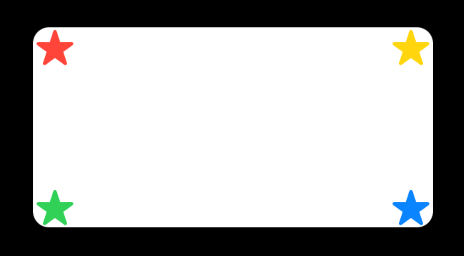
다음과 같은 뷰를 구현할 수 있다.
이렇게 보면 둘이 같은거 아닌가? 생각이 든다. 하지만 둘은 명확한 차이점이 있다.
✅ ZStack과 overlay의 차이점
overlay 문서의 마지막 단락에서는 이렇게 말한다.
[! document] You can achieve layering without an overlay modifier by putting both the modified view and the overlay content into a
ZStack. This can produce a simpler view hierarchy, but changes the layout priority that SwiftUI applies to the views. Use the overlay modifier when you want the modified view to dominate the layout.
ZStack에 쌓아야할 뷰를 모두 넣으면 계층 구조가 단순해지는 반면, 각 뷰에 적용할 레이아웃의 우선순위는 달라진다.- 따라서 원래 뷰의 우선순위를 유지하며 컨텐츠를 쌓고 싶다면 overlay modifier를 사용하라고 이야기한다.
- 즉, 어떤 뷰가 레이아웃을 지배할지, 주도할지에 따라 선택해야한다는 말이다.
이렇게 보면 무슨 말인지 잘 모를 수 있으므로 예를 들어보자!
같은 뷰를 각각 ZStack 과 overlay 로 구현하였다.
ZStack {
	Image(systemName: "globe")
		.resizable()
		.scaledToFit()
		.frame(width: 50)
	Text("Hello, world!")
		.foregroundStyle(.orange)
		.font(.system(size: 15))
		.fontWeight(.bold)
}

Image(systemName: "globe")
	.resizable()
	.scaledToFit()
	.frame(width: 50)
	.overlay {
		Text("Hello, world!")
			.foregroundStyle(.orange)
			.font(.system(size: 15))
			.fontWeight(.bold)
	}

다음과 같은 결과를 보인다.
이러한 결과를 보이는 이유는
ZStack으로 생성 시에는 각 뷰가 같은 레이아웃 우선순위를 가지기 때문에 레이아웃의 계산이 명확하지 않고- 따라서
overlay로 생성할 시 기준 뷰 즉, 아래 뷰의 크기를 그대로 유지한 채로 그 위에 다음 뷰가 쌓이기 때문에 예측 가능한 레이아웃 구현이 가능하다.
따라서 !
1. 우선순위 상관없이 뷰가 나란히 쌓이면 되는 뷰에서는 ZStack
2. 무조건 기준 뷰가 레이아웃 더 높은 우선 순위를 가져가야한다면 overlay
를 사용하는 것이 맞다고 판단하였다.
⭐️ 해결 방법
현재 구현해야할 뷰는 다음과 같다.
위의 뷰에서는 이미지가 정확하게 기준 뷰 안에 들어와야 하고 예측 가능한 레이아웃이 필요하다고 생각하였다.
따라서 overlay modifier를 활용해 alignment를 bottomTrailing으로 설정하여 쌓이는 뷰를 구현했다.
또한, 기준 뷰에서 x,y축으로 offset을 설정하여 공간을 주었다.
👀 느낀점 및 배운점
이전에 테두리에 색을 줄때 overlay modifier를 사용하곤 했는데 “아 뷰를 쌓아서 위에 테두리를 올려주는구나. 그렇게 쓰면 되겠다” 하고 썼었는데 생각해보니 ZStack도 뷰를 쌓기 위한것임은 같은데 왜 ZStack으로 해볼 생각은 못했지? 하는 생각이 들었다.
각각의 modifier가 왜 쓰이는지 알고, 명확하게 써야할 부분에만 작성하는 습관을 들여야겠다!